Kādo
I have obtained a new hobby.
Who doesn’t like collecting small pieces of card with artwork on them.
Whether it’s Riftborn for Riot’s League of Legends world, One Piece, Disney’s Lorcana or..
Pokémon!
My Collection..⌗
..has grown a lot quite quickly.
Started around 5-6 months ago collecting a Pokémon I have grown to love.

These 2 are adorable, but very much a threat to humans. So much so, their entire habitat is off limits.
First my collection started out with common cards, the cheap ones, ones people sell for pennies.
Then I got word of a “Illustration Rare” Stufful.. I knew I had to get it.
After a few weeks of looking online I knew I wanted to buy it in hand, so I found my local card vendor, Card Empire in my city. Shortly after I left with..
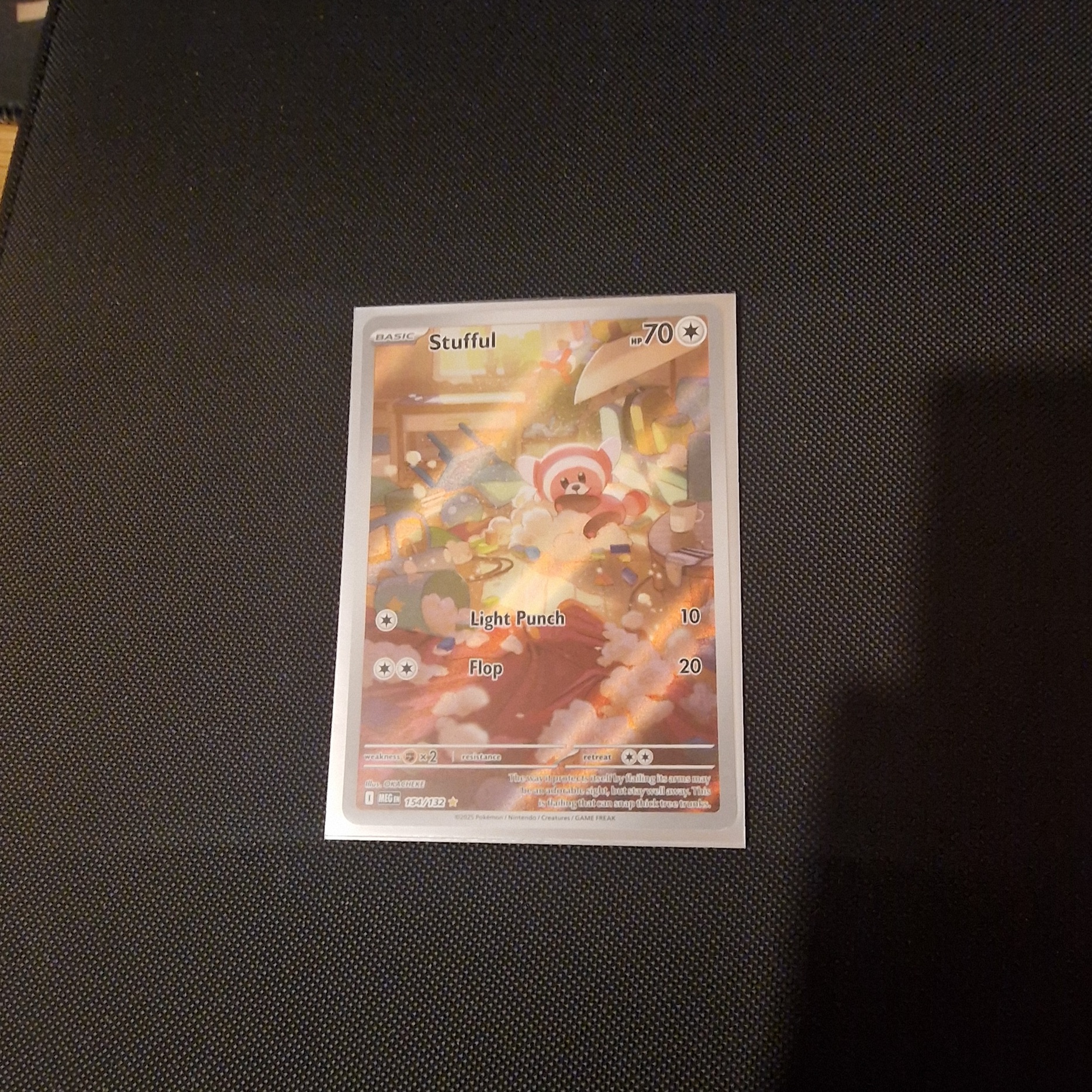
Isn’t it just the cutest.. And then..
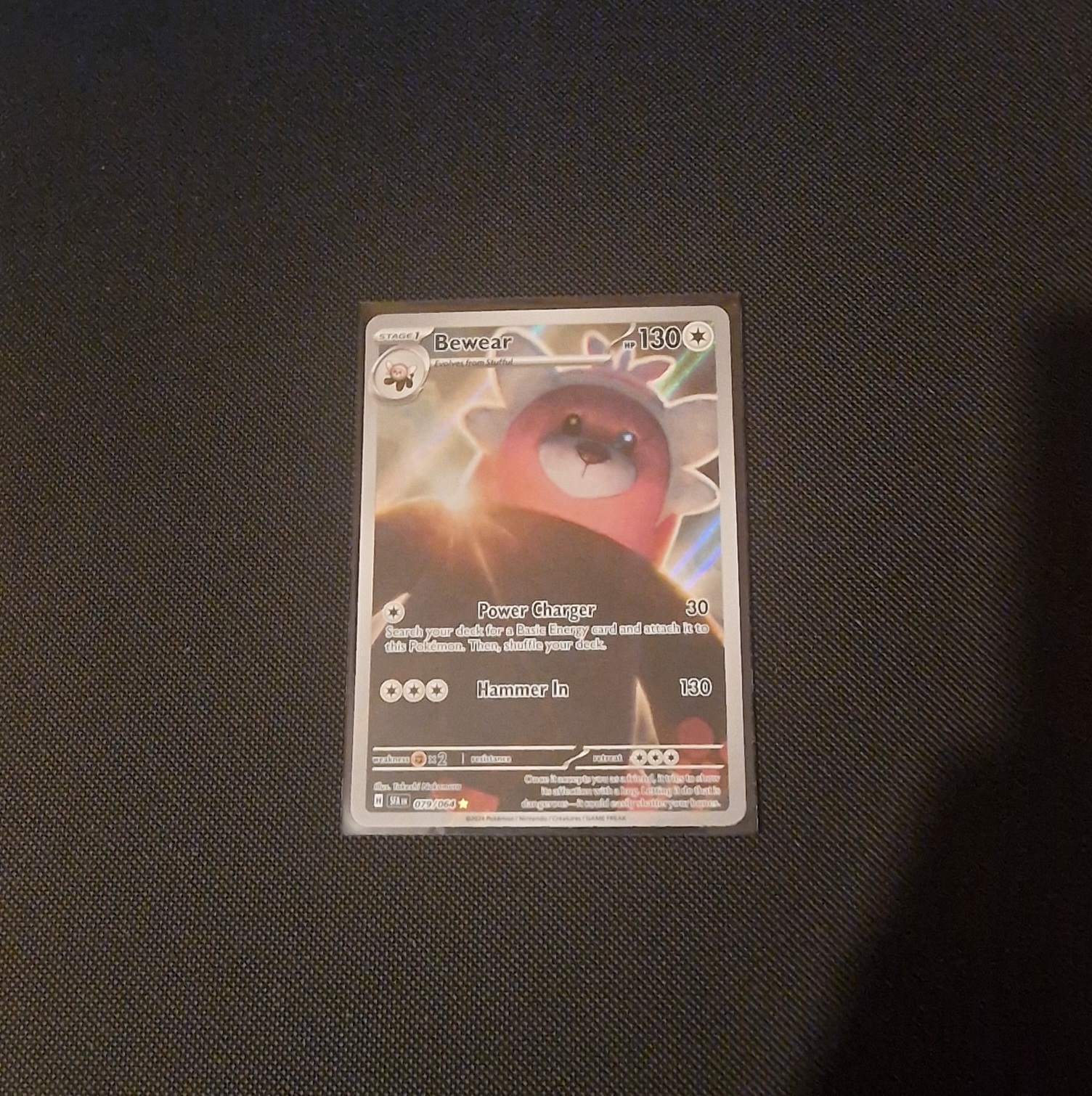
But after all the card buying it gets disorganised, cards in small boxes, some in toploaders, some sleeved, some not sleeved. You need a way to manage it all.
Binders - AKA Solution 1⌗
These help a lot, you can get padded zipped ones like mine from VaultX, or old school metal clip binders for bulk loads of cards you don’t care much for.
But this only solves part of the problem.
You get a nice place to put your cards, they’re safe in a padded, zipped and waterproof booklet. Some have pages with 9 pockets, some 4, some 1.. Some double sided, some not. Along with a variation of other formats like a toploader binder, or a 12 pocket binder, I have even seen bigger custom made ones.
Apps - AKA Solution 2⌗
Binders help physically, but what if you’re out buying cards, maybe you don’t quite know if the card you’re looking to buy is one you have. Maybe it’s a different variant, maybe it’s a reprint from a older expansion.
Apps let you digitize your collection.
It’s great.. on paper. But there is always a catch.
Monthly subscriptions.
Every app has some kind of monthly subscription, tied to some silly and arbitrary restrictions.
Collectr, Pokellector, Dex, PriceCharting, TCGPlayer.. The list is endless.
But I settled on Dex. It’s relatively simple, you can have folders, add cards to those folders, mark cards as owned, or any variant of a card.
Lets take a look at what Dex prevents you from doing until you pony up your card details.
- More than 3 folders
- Marketplace limit, that seems to be hit and miss at best
- Using the Camera Scanner
- Card Notes
- Friends
- App and Collection Themes
- Favouriting expansions and Pokémon
- Home screen Widgets
- Badges
- Exporting
Quite the limitation. But for only £3.59 a month or £35.99 a year, you can have all of that.. What a bargin.
What if all of that was free⌗
I’ve made an app before.. Sure it wasn’t that great but it worked. So why not now?
I tried 3 times. Each time had a different problem.
- First it was sourcing data. There were public and free sources of data for Pokémon cards.
- Second it was design. I couldn’t get it visually how I wanted it to work.
- Third it was bad choice of app development method.
All 3 had problems but each time I resolved them, and now we have the Fourth attempt.
Kādo⌗
My in house project that has finally hit the point of releasability.
Fully local and offline Pokémon card tracking app.
Unlimited folders. Unlimited virtual binders. Market links. Local Card Scanner.
Data Source⌗
The app is useless without the data.
Source being a paid one, it’s around $29 a month but they push you to go for the $99 a month one, because of course they try to upsell you.
But what does that even get you?
- 50,000 API “Credits”, 1 API request = 1 Credit
- All TCGs, not just limited to Pokémon
- Pricing data for raw and graded cards
- Graded pop reports
- Price trends and history data
- Image Analysis, of which I assume just means cloud camera scanning
If you opt for the cheaper subscription you get dropped to 5,000 API Credits, All TCGs still and just raw prices.
So what did I do?
Scraped it of course.
No need to pay for it if they offer it up for free via HTTP requests, right?
This source being aimed at developers in the TCG scene thought it would be nice to include a “View API” button on a page with data, this then pops up a boring typing animation of the API request being made, to then just dump the API response. Even better, it’s baked into the HTML at request, meaning no extra request is needed.
Idiots.
But it includes a metric fuck ton of data I don’t give a shit about, so I do a quick cleanup pass once its all scraped to clear out the pricing information. I couldn’t care less about the pricing in my app.
One added feature of the app is it’s ability to pull data it doesn’t have without the need for all the tooling I have on my PC for Kādo. So it does have some networking, just for updating any expansions that may have released that I haven’t gotten round to sourcing yet, so I keep up to date without always needing my PC.
Frontend⌗
First attempt used Android’s Jetpack Compose, Second was a website, Third was a PWA.
Kādo is back to using Jetpack Compose for the native speed and feel.
A lot of which is in Kotlin, a Java subset that compiles down to the same(ish) bytecode.
It feels like if Java and Go had a baby. Semi colons are mostly optional, the language is very functional-like with chainable methods and for all it’s worth actually not a terrible language to use.
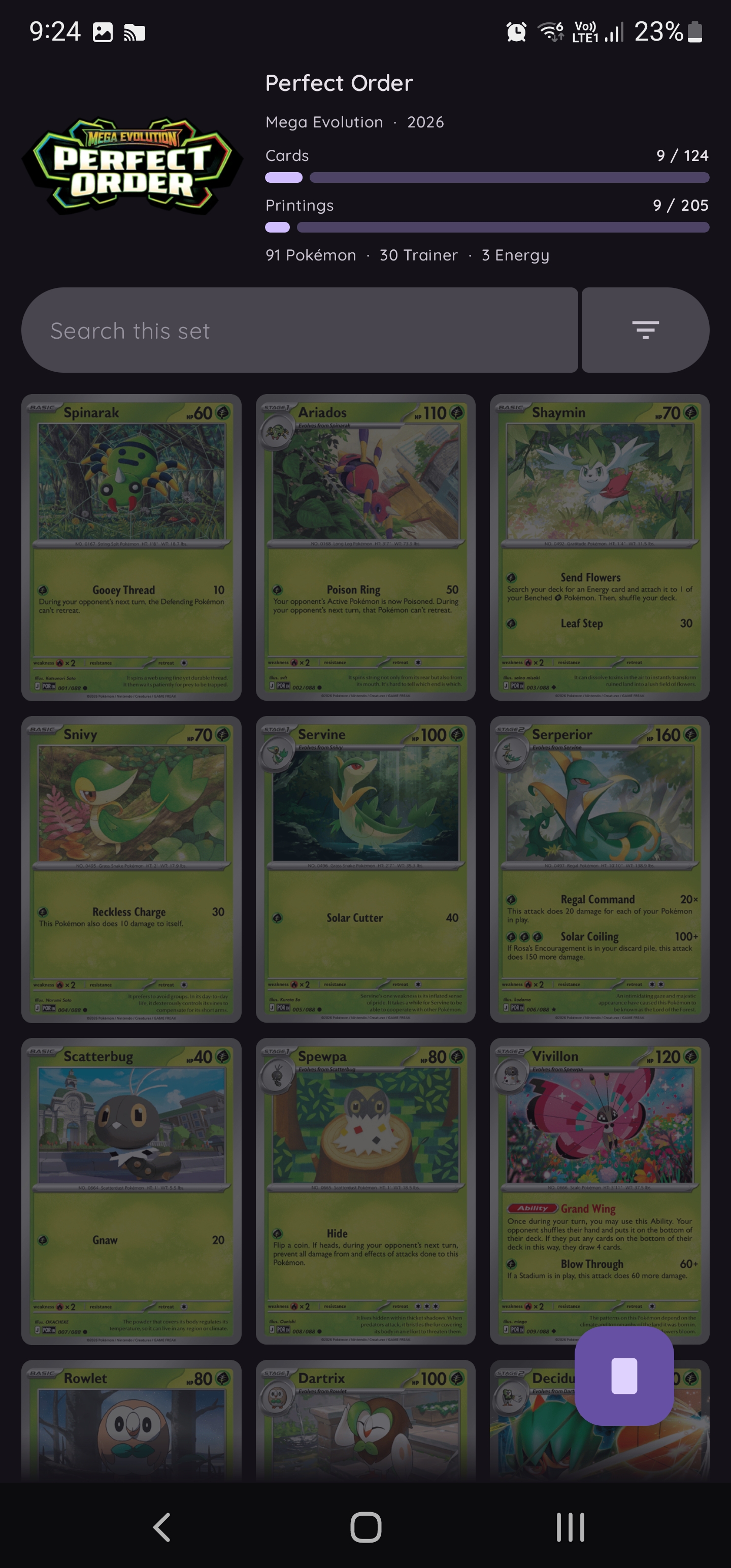
Language aside, I needed a design. Something that felt right and just worked..
Pokémon is Japanese, so I thought the Japanese are pretty functional when it comes to having something that is the “it just works” design.
So a lot of what I have is implicit in function and explicit in design.
Everything is rounded. Groups are joined in shape. You know where one set of controls ends and where another set starts.
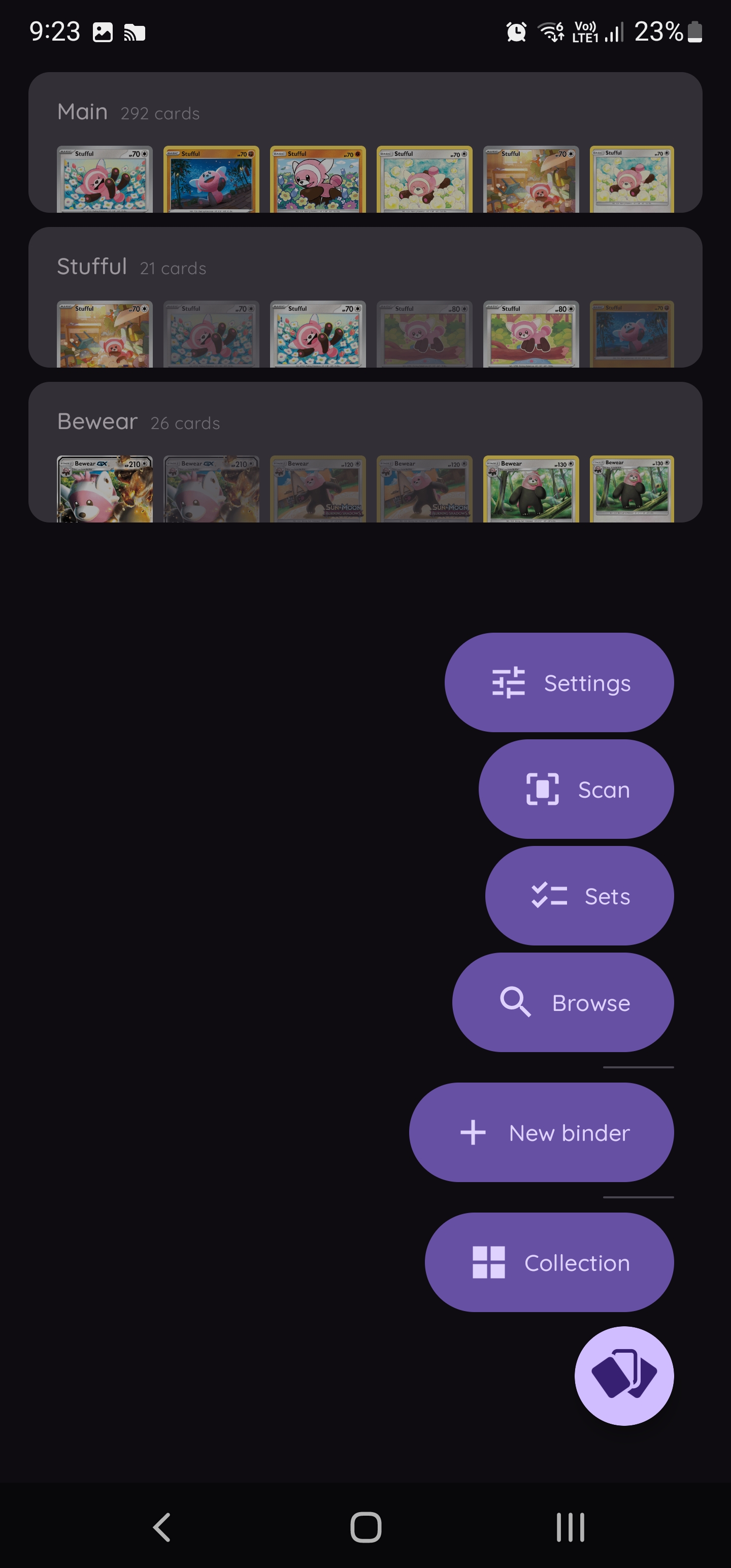
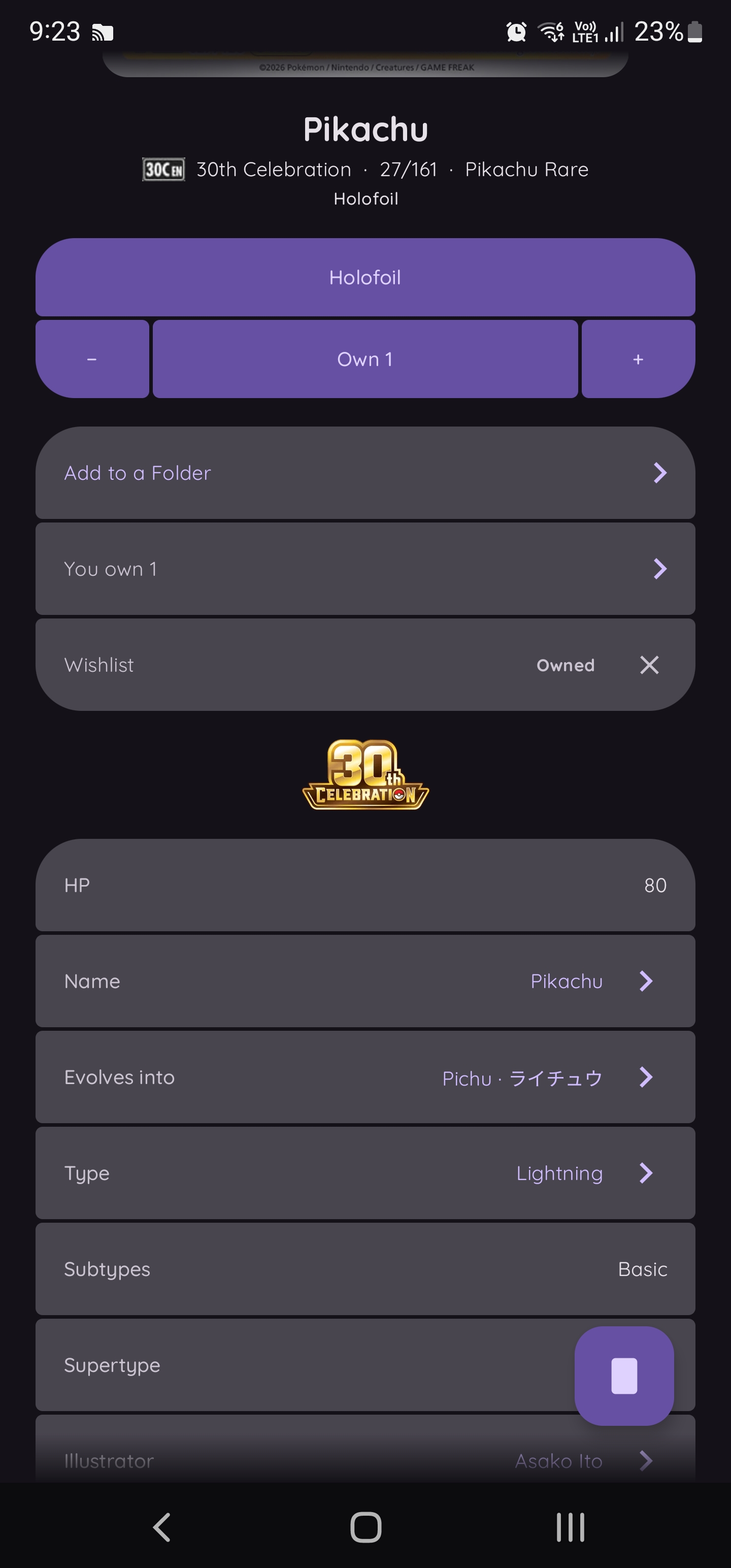
Feature Set⌗
Viewing cards is the simple part.
But Kādo has everything else and more.
Folders⌗
I can create as many folders as I want. Add as many cards to each one as I like.
Viewing a card that sits in a folder, shows its in there
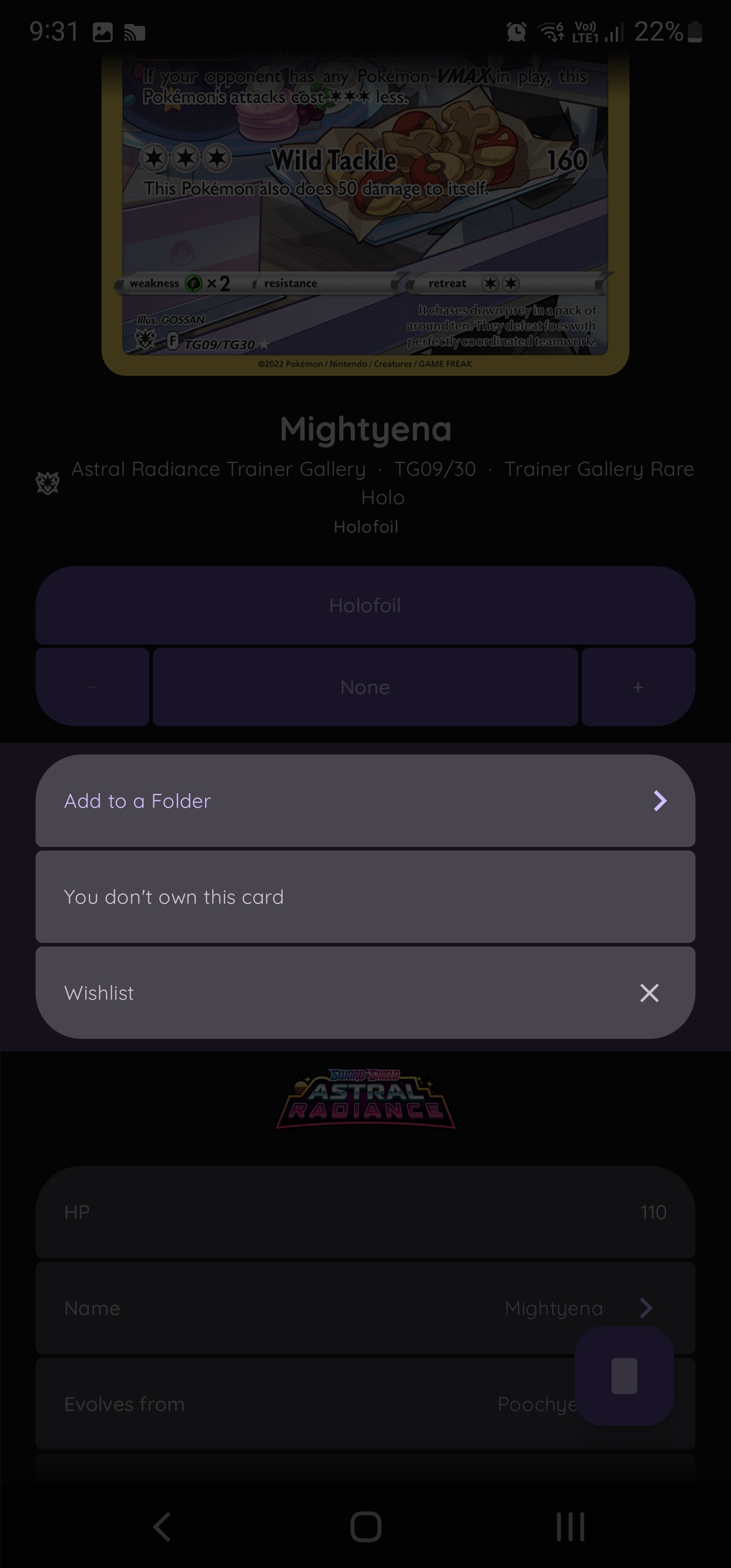
Tapping on such folder entry takes you to the folder, scrolls to the card and flashes it for you, so you know exactly where it is.
Owned Cards⌗
Mark a card as owned, if you own multiple, tap it even more. Switch the variant to another and you can add those too.
Any card marked as owned, one or more, shows in a dedicated “Owned Cards” list, simple enough!
Virtual Binders⌗
One thing Dex doesn’t have, that some others do, are Virtual Binders.
They’re just like folders except you get to handle placement of any card in any pocket.
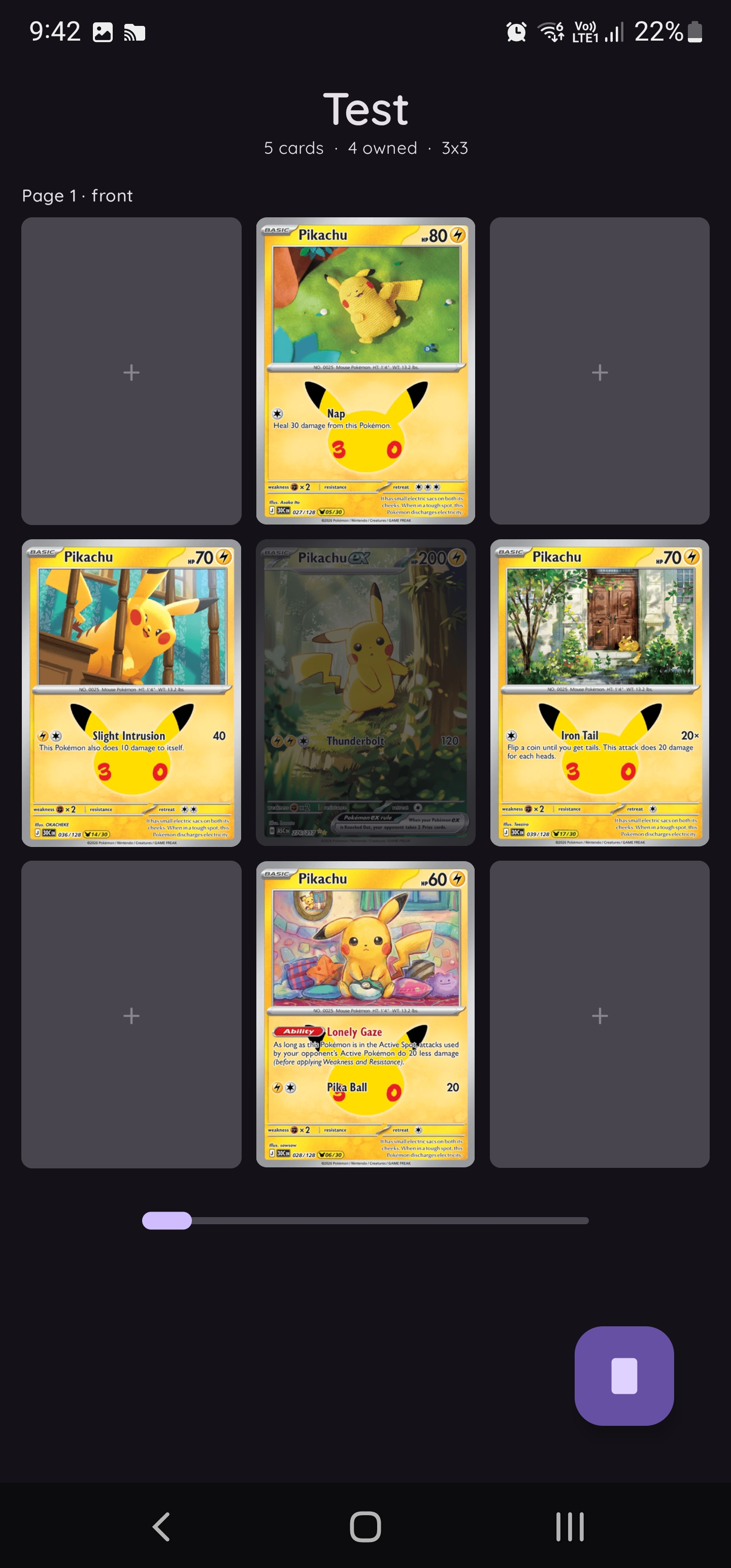
Dimmed cards are ones you don’t own, else it shows in full. But only if you have it and that many.
Fill a page with all of the same card, while you only have 3, only 3 of those in that page will be lit up.
Rather smart if you ask me.
Draggable cards to rearrange the ordering as well.
Not only do people use binders to have their collection laid out, sometimes they do what is called a Master Set.
Pick a mon and get all of their cards, every variant.
Kādo makes this easy with a Master Set feature, pick a binder, tell it you want to create a master set and it asks which Pokémon, it then fills every pocket with every card for that Pokémon, along with all the variants. Including reprints.
Do love a good scope creep.
Card Scanner⌗
Speaking of scope creep.
This was one feature I wanted, but I knew it would be quite hard.
There’s stuff surrounding how existing apps do card scanning that went completely over my head so I had 4 attempts at implementing this and got it on the last.
The downside to how I pull data is if the app pulls new expansions in the app, fingerprinting data doesn’t work for those new cards, which is a known issue. Minor but annoying.
OCR⌗
That’s “Optical Character Recognition” 🤓👆
This was my first attempt and in all fairness, it was a relatively good attempt.
It worked, maybe 60-70% of the time. The struggle were reprints. There are a lot of cards out there that got reprinted in newer expansions or reused in collaborations. This is common with the McDonald’s line of cards.
The trick was to use the Card Index in the bottom corner of every card. This told you out of the expansion’s whole lot, which card it was. The problem was getting OCR to work on such a small number.
This fell through for that reason. It was also pretty slow, but for the first attempt, it wasn’t all that bad.
dHashing and Hamming Distance⌗
Which is difference hashing if I recall correctly.
You create fingerprints of images at a set scale, then with any image you can resize it, run it through the dHash algo and get a fingerprint that when compared gives you the distance between the 2 images.
A lower bit count in the difference meant the images were closer or a match.
The trouble with this one was getting a clean cut image of a card, because all the fingerprints given to the app were made from scans, edge to edge with no background, the resulting difference was around 30-40 for a matching card and 70+ for one that didn’t match.
It struggled with reprints since you could fingerprint 3 different cards from different expansions all with the same artwork and get all relatively close fingerprints. So scanning one yielded results that were too close to separate. This is the McDonald’s issue all over again, except this time I couldn’t really do anything about it.
OCR + dHashing and Hamming Distance⌗
My 3rd attempt was, well if dHashing yielded results that struggled with reprints, maybe I could use the OCR attempt to hard focus on the card index.
Take a look at the following example.
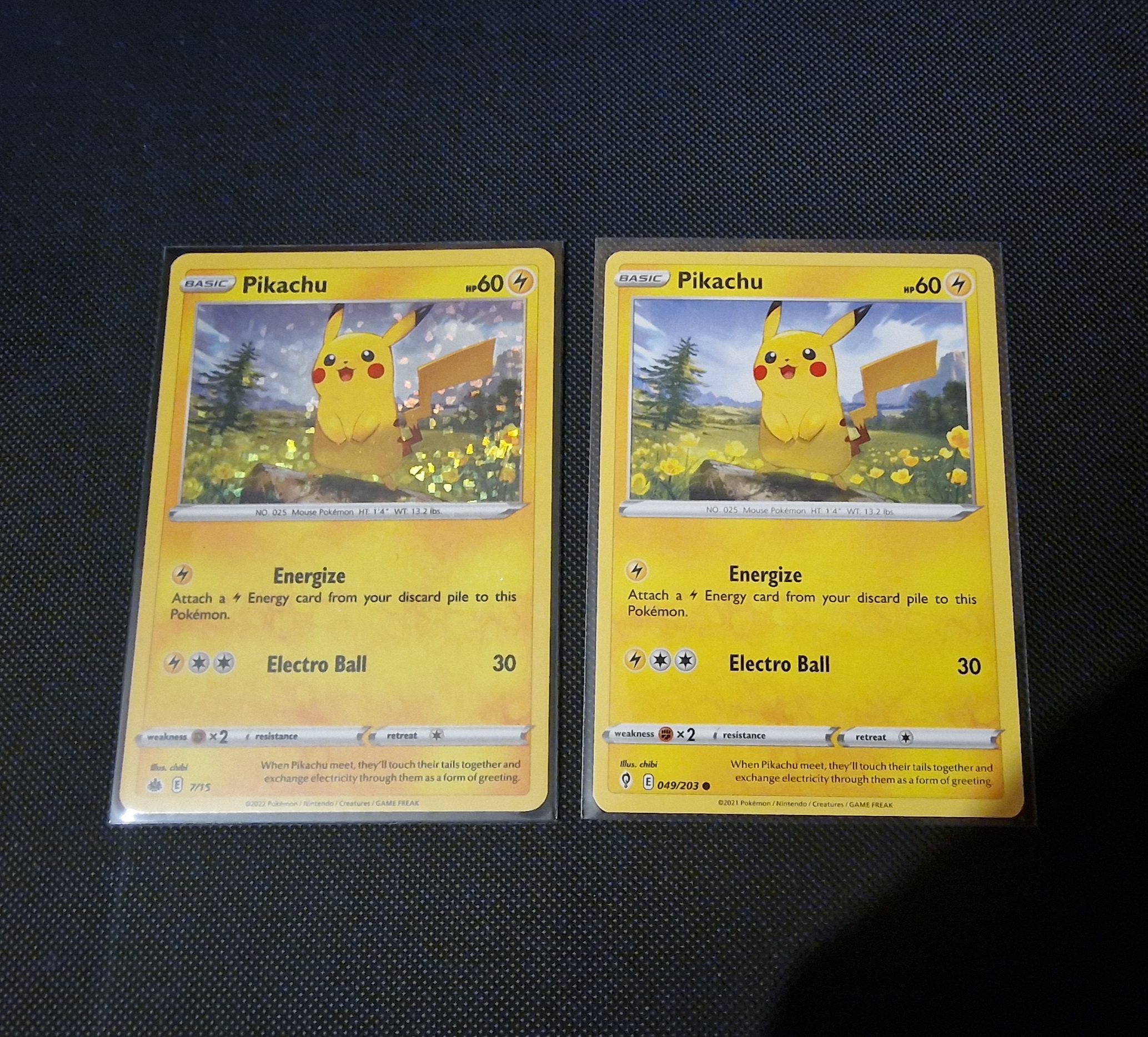
These 2 cards would have a fingerprint within bits of each other. Making it impossible to tell which is which.
Except, if we look in the bottom left of each, its “7/15” and “049/203”. The left is McDonald’s 2022 Collection, the right is Evolving Skies.
So we have a way to determine the difference, the very small, really hard to see on a phone camera, card index.
I tried and tried and tried, but I couldn’t get the OCR to behave well enough for me to use it. On top of that, the card index isn’t always numbers, the Galarian Gallery from Crown Zenith uses “GG” as a prefix for their indicies, along with the fact that it’s black on white, italic small print text.
This was a bust.
Computer Vision Models⌗
The final attempt.
This was a long and rather annoying attempt.
My thinking was, “dHashing is incredible, but the phone just sucks at finding Pokémon cards, is there a solution to this?” and of course the answer is in part AI.
Not LLMs though, computer vision. The kind of model that can take a frame from a camera and spit out bounding boxes around objects it knows.
You see this a lot these days with CCTV footage, they apply a silly model over it and it can detect, “thats a car”, “thats a person”, “thats a bird”, “thats a window”.
So could I somehow make my own model to find a card in an image, resolve the perspective and run it through the dHash and Hamming Distance setup.
Yes, but it’s an incredibly boring and laborous process.
After a very short lookup I found the Ultralytics “YOLO26-nano pose model”, but we can’t just throw that at an image and it find a card. We have to train it.
By training it I have to take images and videos of cards, none cards, tables, card shaped objects and mark out where the card is, starting with it’s top left corner, ending with it’s bottom left corner, this also then teaches the model an orentation too.
I did this for about a week. Hundreds of individual frames marked. It was a nightmare.
But it was seeing results, it could find every Pokémon card in an image.. that was properly lit and squared with the card.
I forgot to factor in lighting changes, glare, toploaders, sleeves, binder pockets, cards upside down.
So I recorded and took footage of all of that, smart bulb to change the colour of the room, some cards in toploaders, some in ETB sleeves, some in penny sleeves, some in binder pockets, upside down, at an angle. Everything. For another week.
And it paid off! The results were great, I was getting outlined cards within margins of error I could accept. And it was all local. On my PC. Using my GPU.
But that was fine, turns out you can export a model like this in a format called ONNX which luckly there is a library for Android to load and use at runtime.
Unfortunately the card detector model wasn’t the only model we needed, finding the card is the easy part. Actually getting it squared off and within bounds for dHash to be of use needs another, refiner model.
This is used after the detector has found the card and unfortunately is the one part of the scanning I don’t understand. Hence Claude Code did all the work for the refiner.
It explains it as “computing homography from card millimeteres to frame pixels. for that corner it builds a 14mm x 14mm window centered on the corner, rotated a quarter per corner, then samples a 96x96 patch from the full image through the combined map which is about 7 patch pixels per mm”. Yeah ok Claude. Thanks.
Once piped all up, we were seeing proper results. 99.8% cards found, 94.2% of the corners of those cards were within a 2% error and the card it thought it was via dHashing was right the first time 95.4% of the time, and that’s just one frame. Across 2 frames that’s near perfect. Of which we do.
We only mark a card as found if 2 frames’ results come back the same card, then we outline the card in the camera view and make it green with the Pokémon name for a bit of flare. Tap the card in the camera view and you’re taken straight to the card.
There is still the problem of reprints. The solution to this was to not try and separate the reprints from each other, instead we forward the user to Kādo’s Search with the most confident cards as ones that are viewable, noting that those are the ones it thinks it might be but isn’t confident enough to say one or the other. It’s then up to the user to decide which it is.
Mode of Operation⌗
Now the scanner works, why not add to it.
The card scanner now has 3 modes of operation. Single, Repeat and Image/Video.
Single is the easiest. Point it at a card, it matches the card to a result and takes you to the card straight away. It’s great, but not to blow smoke up my own arse, the scanner is that fast, if you point it at the wrong card for even a second, it takes you to that card instead. Dare I say it’s too fast.
Repeat is the most fun. Point it at a bunch of cards, it matches every single one of them in real time. Tap on any of them and it takes you straight to it. The downside of this mode is computation. From frame to results its about 100ms, that does crawl higher with more cards in the picture, but it’s still taxing on the device, so there are settings to dial down how often the scanner scans.
Image/Video makes use of the scanner on images or videos. Ask it to scan a video, it will go through each frame and find all the results, tap on a result and it takes you to that timestamp and flashes where the card is in the video for you. Double tap and it takes you to the first sighting of it, to the point where the scanner lost sight of it. The image side of this is just the same, but less accurate. Since the scanner’s matching design was made to work across more than one frame that agreed on a result, only returning results based on a single frame isn’t ideal, but it still works.
Overall the scanner is a pretty decent bit of kit, and it works entirely offline.
Kādo is probably the best app for Pokémon card tracking, but I can’t release it publically due to how I obtain the data.
That being said, it’s still something I am very proud of and will continue to add to as I go on.